
Patient Registration with PostgreSQL: A Real-World Outbox Pattern Example
This comprehensive guide demonstrates how to implement the Outbox Pattern using Hermes PostgreSQL in a real-world patient registration system. This example showcases how to maintain consistency across distributed operations without sacrificing reliability.
Overview
Patient registration is a common scenario in healthcare systems that involves multiple I/O operations across different services:
- Create a user in an Identity Provider (IdP)
- Store patient data in the application database
- Publish success/failure events to notify other parts of the system
The challenge: How do we ensure consistency when any of these operations can fail independently?
The Problem: Distributed State Management
Consider this scenario:
async function registerPatient(email: string) {
  // Step 1: Add user to Identity Provider
  const subject = await addUserToIdentityProvider(email)

  // 💥 App crashes here!

  // Step 2: Store patient in database
  await storePatient(patientId, subject)

  // Step 3: Publish success event
  await publishEvent({ type: 'PatientRegistered', ... })
}
What happens if the app crashes between steps?
- User exists in IdP ✅
- Patient data not stored in database ❌
- No event published ❌
- System is in an inconsistent state 🔥
Traditional solutions like try-catch blocks, transactions, or compensation logic don't fully solve this problem because:
- External service calls (IdP) cannot be rolled back
- Network failures can happen between any two operations
- Message broker outages prevent event publishing
- Recovery logic itself can fail
The Solution: Outbox Pattern with PostgreSQL Logical Replication
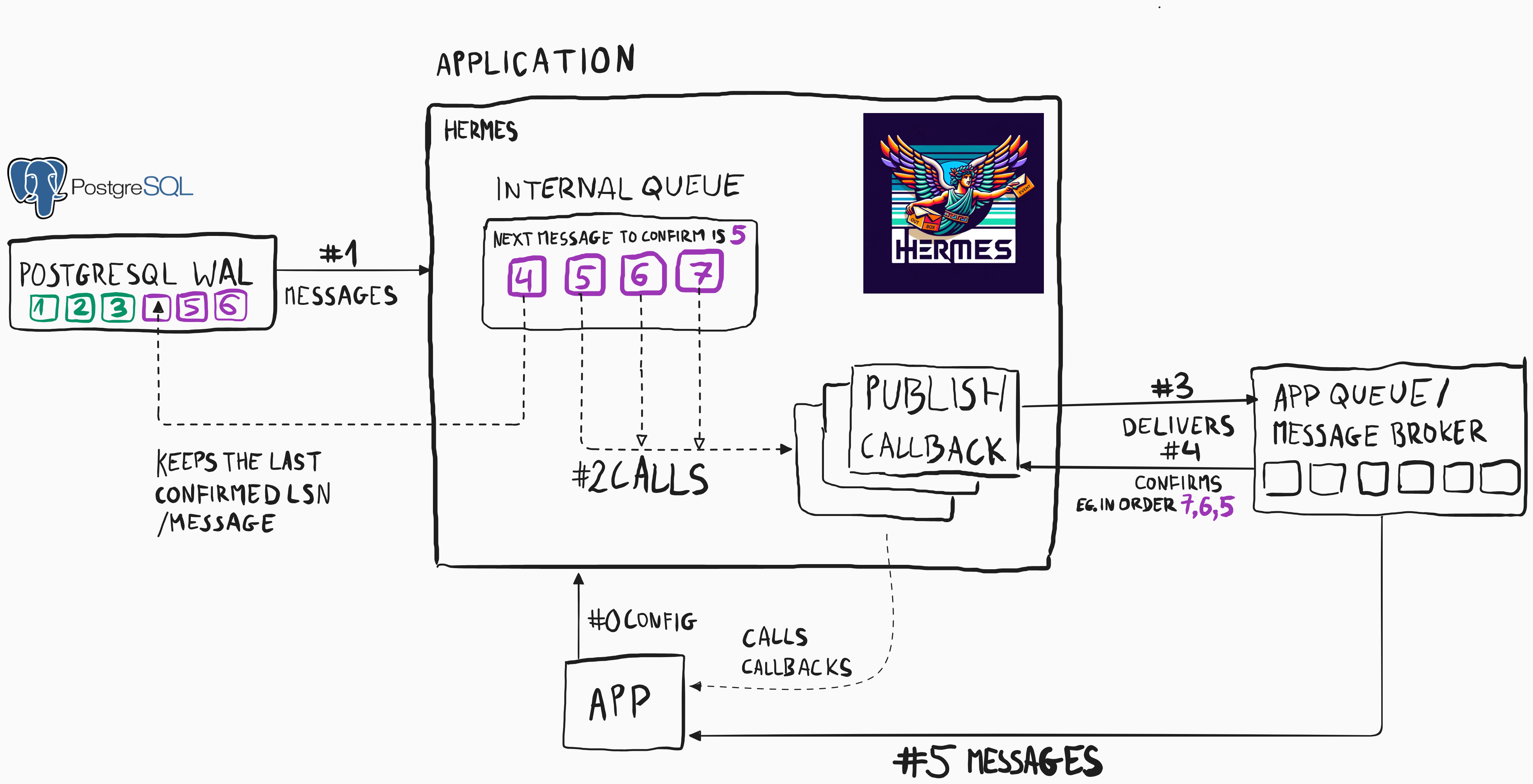
Hermes PostgreSQL solves this by leveraging PostgreSQL's Write-Ahead Log (WAL) and Logical Replication:
- Queue commands/events in the database instead of executing them directly
- PostgreSQL guarantees durability through its WAL
- Hermes streams changes via Logical Replication
- At-least-once delivery ensures messages eventually reach handlers
- Idempotent handlers safely handle duplicate messages
Key Benefits
- No message loss: WAL ensures durability even if the app crashes
- No polling overhead: Logical Replication streams changes in real-time
- No message gaps: Unlike auto-increment IDs, LSN (Log Sequence Numbers) are sequential
- Transactional consistency: Events are committed atomically with data changes
Architecture
The patient registration flow uses a saga-like pattern with commands and events:
HTTP Request → Queue _AddUserToIdp Command
                ↓
        Add User to IdP (external I/O)
                ↓
        Queue _StorePatient Command
                ↓
        Store Patient in DB + Queue Success Event (single transaction)
                ↓
        Publish PatientRegisteredSuccessfully Event
Message Types
Commands (Internal)
_AddUserToIdp: Initiate user creation in IdP_StorePatient: Store patient data in database_RevertPatientRegistration: Compensate failed operations
Events (Public)
PatientRegisteredSuccessfully: Registration completedPatientRegistrationFailed: Registration failed after retries
Implementation Walkthrough
1. Define Message Types
import { Command, Event, DefaultCommandMetadata } from '@event-driven-io/emmett'
import { Uuid4String, NonEmptyString } from '@arturwojnar/hermes'

type PatientId = Uuid4String<'PatientId'>
type Subject = NonEmptyString<'Subject'>
type Email = NonEmptyString<'Email'>

type CommonMetadata = DefaultCommandMetadata & {
  redeliveryCount: number
  messageId: string
}

// Internal commands
type _AddUserToIdp = DomainCommand<
  '_AddUserToIdp',
  {
    systemId: PatientId
    email: Email
  }
>

type _StorePatient = DomainCommand<
  '_StorePatient',
  {
    systemId: PatientId
    sub: Subject
    email: Email
  }
>

type _RevertPatientRegistration = DomainCommand<
  '_RevertPatientRegistration',
  {
    systemId?: PatientId
    sub?: Subject
  }
>

// Public events
type PatientRegisteredSuccessfully = DomainEvent<
  'PatientRegisteredSuccessfully',
  {
    patientId: PatientId
    patientSub: Subject
  }
>

type PatientRegistrationFailed = DomainEvent<
  'PatientRegistrationFailed',
  {
    email: Email
  }
>
2. Create the Outbox Consumer
The outbox consumer bridges PostgreSQL Logical Replication with your message handlers:
import { createOutboxConsumer, useBasicAsyncOutboxConsumerPolicy } from '@arturwojnar/hermes-postgresql'

const outbox = createOutboxConsumer<RegisterPatientCommand | RegisterPatientEvent>({
  getOptions() {
    return {
      host: 'localhost',
      port: 5444,
      database: 'hermes',
      user: 'hermes',
      password: 'hermes',
    }
  },
  publish: async (message) => {
    /*
      If this callback successfully finishes ✅,
      then the event is considered as delivered 📨🎉

      If this callback throws an error ⛔,
      then Hermes PostgreSQL will try to deliver this message again later ⏲️
    */

    if (Array.isArray(message)) {
      for (const nextMessage of message) {
        await publishOne(nextMessage)
      }
    } else {
      await publishOne(message)
    }
  },
  consumerName: 'app',
  asyncOutbox: useBasicAsyncOutboxConsumerPolicy(), // For compensation commands
})

// Start consuming messages
const stopOutbox = await outbox.start()
Key Configuration:
getOptions(): Database connection detailspublish: Callback invoked for each message (must throw on failure)consumerName: Unique name for this consumer (used for replication slot)asyncOutbox: Separate queue for non-critical messages (compensations, notifications)
3. Implement Message Handlers
Handler 1: Add User to Identity Provider
This handler creates a user in the external IdP and queues the next command:
messageBus.handle<_AddUserToIdp>(async ({ data, metadata }) => {
  let sub: Subject | undefined

  try {
    console.info(`Adding user to IdP`)
    sub = await addUserToIdentityProvider(data.email)

    // Queue the next command to store patient data
    await sendStoreCommand(sub, data.systemId, data.email)
  } catch (error) {
    // Handle idempotency: user might already exist from a previous attempt
    if ((error as Error)?.name === 'UserAlreadyExistsError') {
      const existingSub = await getIdPUser(data.email)
      await sendStoreCommand(existingSub, data.systemId, data.email)
    } else {
      console.error(error)

      // If user was created but command queueing failed, revert the user
      if (sub) {
        await revertRegistration({ sub }, data.email)
      }

      // Don't throw - we've queued compensation, so mark this as handled
    }
  }
}, '_AddUserToIdp')

const sendStoreCommand = async (sub: Subject, systemId: PatientId, email: Email) => {
  const storePatientCommand = {
    message: {
      kind: 'command',
      type: '_StorePatient',
      data: { systemId, sub, email },
    },
    messageId: constructMessageId('_StorePatient', sub),
    messageType: '_StorePatient',
  }

  // Queue command in the outbox (durable)
  await outbox.queue(storePatientCommand)
}
Important patterns:
- Idempotency: Check if user already exists before failing
- Compensation: Queue revert command if partial failure occurs
- No direct throwing: Queue compensation instead of throwing to prevent infinite retries
Handler 2: Store Patient in Database
This handler stores patient data and publishes the success event in a single transaction:
messageBus.handle<_StorePatient>(async ({ data }) => {
  try {
    console.info(`Storing patient data`)

    // Start a transaction
    await sql.begin(async (sql) => {
      // Store patient data
      await storePatient(data.systemId, data.sub, sql)

      // Queue success event in the SAME transaction
      const patientRegisteredEvent = {
        message: {
          kind: 'event',
          type: 'PatientRegisteredSuccessfully',
          data: { patientId: data.systemId, patientSub: data.sub },
        },
        messageId: constructMessageId('PatientRegisteredSuccessfully', data.sub),
        messageType: 'PatientRegisteredSuccessfully',
      }

      // Pass transaction to outbox - ensures atomicity
      await outbox.queue(patientRegisteredEvent, { tx: sql })
    })
  } catch (error) {
    // Handle idempotency: patient might already exist
    if ((error as PostgresError)?.code === '23505') {
      // Unique constraint violation
      return
    }

    console.error(error)

    // Queue compensation to clean up IdP user and database
    await revertRegistration({ sub: data.sub, systemId: data.systemId }, data.email)
  }
}, '_StorePatient')
Critical pattern: Transactional Event Publishing
await sql.begin(async (sql) => {
  await storePatient(data.systemId, data.sub, sql)
  await outbox.queue(patientRegisteredEvent, { tx: sql }) // ← Pass transaction
})
This guarantees that either both succeed or both fail. The event will only be published if the patient data is stored successfully.
Handler 3: Revert Registration (Compensation)
This handler cleans up resources when registration fails:
messageBus.handle<_RevertPatientRegistration>(async ({ data, metadata }) => {
  try {
    // Clean up database if systemId provided
    if ('systemId' in data && data.systemId) {
      await removePatient(data.systemId)
    }

    // Clean up IdP if subject provided
    if ('sub' in data && data.sub) {
      await removeUserFromIdentityProvider(data.sub)
    }
  } catch (error) {
    // Retry up to 5 times, then give up
    if (metadata && metadata.redeliveryCount < 5) {
      throw error // Trigger redelivery
    }
    // Log for manual intervention if needed
    console.error('Failed to revert registration after 5 attempts', error)
  }
}, '_RevertPatientRegistration')

const revertRegistration = async (params: { systemId?: PatientId; sub?: Subject }, email: Email) => {
  const messageIdParam = params.sub?.toString() || params.systemId?.toString()

  const revertCommand = {
    message: {
      kind: 'command',
      type: '_RevertPatientRegistration',
      data: params,
    },
    messageId: constructMessageId('_RevertPatientRegistration', messageIdParam),
    messageType: '_RevertPatientRegistration',
  }

  const registrationFailedEvent = {
    messageId: constructMessageId('PatientRegistrationFailed', messageIdParam),
    messageType: 'PatientRegistrationFailed',
    message: {
      kind: 'event',
      type: 'PatientRegistrationFailed',
      data: { email },
    },
  }

  // Use async outbox (separate queue) since compensation timing doesn't matter
  await outbox.send([revertCommand, registrationFailedEvent])
}
Why use async outbox (send) instead of regular outbox (queue)?
- Compensation commands don't need immediate processing
- They don't block the main WAL replication stream
- Reduces PostgreSQL WAL retention requirements
4. Initiate Registration from HTTP Endpoint
const registerPatient = async (params: { email: string }) => {
  const patientId = parsePatientId(crypto.randomUUID())

  // Create the initial command
  const addUserToIdPCommand = {
    message: {
      kind: 'command',
      type: '_AddUserToIdp',
      data: { email: parseEmail(params.email), systemId: patientId },
    },
    messageType: '_AddUserToIdp',
    messageId: constructMessageId('_AddUserToIdp', patientId),
  }

  // Queue the command (durable, survives crashes)
  await outbox.queue(addUserToIdPCommand)

  return patientId
}

app.post('/patient', async (req, res) => {
  const patientId = await registerPatient(req.body)

  try {
    // Wait for eventual consistency (optional for synchronous APIs)
    await waitForResult(patientId)
    res.send({ id: patientId })
  } catch (error) {
    res.sendStatus(StatusCodes.REQUEST_TIMEOUT)
  }
})
Note on waitForResult: This is optional and only needed if your API must return synchronously. For truly event-driven systems, you would return immediately and notify via webhooks or polling.
Key Patterns and Best Practices
1. Idempotent Message Handlers
Since Hermes guarantees at-least-once delivery, handlers may execute multiple times:
// ✅ Good: Check if work already done
if (await userExists(email)) {
  return // Already processed, safe to skip
}

// ❌ Bad: Assuming this is the first execution
await createUser(email) // Will fail on retry
Strategies for idempotency:
- Check if the resource already exists
- Use unique constraints in the database
- Store processed message IDs (deduplication)
- Design operations to be naturally idempotent
2. Deterministic Message IDs
Use consistent message ID generation to enable deduplication:
const constructMessageId = (...values: (string | { toString: () => string })[]) => {
  return values
    .reduce((hash, value) => {
      hash.update(value.toString())
      return hash
    }, crypto.createHash('sha256'))
    .digest('hex')
}

// Same inputs always produce the same message ID
const messageId = constructMessageId('_AddUserToIdp', patientId)
This ensures retries don't create duplicate messages in the outbox.
3. Transactional Event Publishing
Always pass the transaction context when publishing events alongside data changes:
// ✅ Good: Atomic operation
await sql.begin(async (sql) => {
  await storePatient(data, sql)
  await outbox.queue(event, { tx: sql })
})

// ❌ Bad: Not atomic, event might not be published
await storePatient(data, sql)
await outbox.queue(event) // Separate transaction!
4. Separate Async Outbox for Non-Critical Operations
Use outbox.send() for compensation, notifications, or other operations where delivery timing is flexible:
// Critical: Use regular outbox (WAL-based)
await outbox.queue(criticalEvent)

// Non-critical: Use async outbox (polling-based)
await outbox.send(compensationCommand)
This reduces WAL retention requirements and improves performance.
5. Graceful Error Handling with Retry Limits
messageBus.handle(async ({ data, metadata }) => {
  try {
    await performOperation(data)
  } catch (error) {
    // Retry transient errors
    if (metadata.redeliveryCount < 5) {
      throw error // Will be retried
    }

    // Give up after 5 attempts
    console.error('Max retries exceeded', error)
    await alertOpsTeam(error)
    // Don't throw - acknowledge message to prevent infinite loop
  }
})
How Hermes PostgreSQL Works Under the Hood
PostgreSQL Logical Replication
Hermes uses PostgreSQL's Logical Replication protocol to stream changes from the Write-Ahead Log (WAL):
- Replication Slot: Hermes creates a named slot (e.g.,
hermes_app) - LSN Tracking: The slot tracks the Log Sequence Number (LSN) of processed messages
- Change Stream: PostgreSQL streams INSERT/UPDATE/DELETE operations in real-time
- Acknowledgment: Hermes acknowledges messages in order after successful processing
Key properties:
- No polling: Changes are pushed, not pulled
- Guaranteed ordering: Messages are processed in commit order
- No gaps: Unlike auto-increment IDs, LSN is strictly sequential
- Restart safety: Unacknowledged messages are redelivered after restart
Message Lifecycle
1. Application calls outbox.queue(message)
   ↓
2. Message inserted into outbox table
   ↓
3. Transaction commits (atomic with business logic)
   ↓
4. PostgreSQL writes to WAL
   ↓
5. Logical Replication streams change to Hermes
   ↓
6. Hermes invokes publish callback
   ↓
7. If successful: Acknowledge (advance LSN)
   If failed: Don't acknowledge (will retry)
Scaling Considerations
Single Consumer per Partition Key
By default, Hermes uses a single consumer per consumerName. For horizontal scaling:
// Tenant 1 consumer
const outbox1 = createOutboxConsumer({
  // ...
  partitionKey: 'tenant-1',
  consumerName: 'app',
})

// Tenant 2 consumer (different partition, same consumer name)
const outbox2 = createOutboxConsumer({
  // ...
  partitionKey: 'tenant-2',
  consumerName: 'app',
})
Message Broker for Multiple Instances
For load distribution across multiple app instances, use a message broker with shared subscriptions:
PostgreSQL WAL → Hermes → Message Broker → [Instance 1, Instance 2, Instance 3]This allows round-robin or partition-based distribution.
Running the Example
Prerequisites
# Ensure Docker is running (for PostgreSQL test container)Running the Example
First, navigate to the example directory and install dependencies:
cd examples/postgresql/patient-registration
npm install
Then run the example:
npm startThis will:
- Start a PostgreSQL container with logical replication enabled
- Initialize the Hermes outbox tables
- Start the outbox consumer
- Start an Express server on port 3000
Testing Registration
curl --location 'http://localhost:3000/patient' \
  --header 'Content-Type: application/json' \
  --data-raw '{"email": "john.doe@example.com"}'
Expected output:
{
  "id": "550e8400-e29b-41d4-a716-446655440000"
}
Observing the Flow
Watch the console output to see:
_AddUserToIdpcommand processed- User added to IdP
_StorePatientcommand queued_StorePatientcommand processed- Patient stored in database
PatientRegisteredSuccessfullyevent published
Testing Failure Scenarios
Simulate IdP failure:
Modify the addUserToIdentityProvider function to throw an error occasionally:
const addUserToIdentityProvider = async (email: Email) => {
  if (Math.random() < 0.3) {
    throw new Error('IdP is down!')
  }
  // ...
}
Observe how Hermes retries the operation and eventually succeeds or triggers compensation.
Complete Source Code
For the full working example, see:
examples/postgresql/patient-registration/index.ts
Advanced Topics
Custom Serialization
By default, Hermes processes messages concurrently. To enforce sequential processing:
const outbox = createOutboxConsumer({
  // ...
  serialization: true, // Process one message at a time
})
Multiple Consumers with Different Partition Keys
Scale horizontally by partitioning messages:
const outboxA = createOutboxConsumer({
  // ...
  partitionKey: 'partition-A',
  consumerName: 'app',
})

const outboxB = createOutboxConsumer({
  // ...
  partitionKey: 'partition-B',
  consumerName: 'app',
})
Messages are routed based on partition key, allowing parallel processing.
Monitoring and Observability
Check replication lag:
SELECT
  slot_name,
  restart_lsn,
  confirmed_flush_lsn,
  pg_size_pretty(pg_wal_lsn_diff(pg_current_wal_lsn(), confirmed_flush_lsn)) AS lag
FROM pg_replication_slots;
Monitor outbox table size:
SELECT COUNT(*) FROM hermes_outbox;
SELECT COUNT(*) FROM hermes_async_outbox;
Troubleshooting
"Replication slot already exists"
This means another Hermes instance is using the same consumerName. Either:
- Stop the other instance
- Use a different
consumerName - Use different
partitionKeyvalues
Messages not being processed
Check:
- Is the outbox consumer started? (
await outbox.start()) - Is PostgreSQL configured for logical replication? (
wal_level=logical) - Are there errors in the
publishcallback? - Check PostgreSQL logs for replication errors
High disk usage
PostgreSQL retains WAL segments for unacknowledged messages. If consumption is slow:
- Check for errors in message handlers
- Increase processing capacity
- Use async outbox for non-critical messages
- Consider partitioning by tenant or domain
Related Resources
- Hermes PostgreSQL README
- PostgreSQL Logical Replication Documentation
- Outbox Pattern Explained
- Microservices.io: Transactional Outbox
Summary
The patient registration example demonstrates:
✅ Reliable distributed operations without 2PC
✅ At-least-once delivery guaranteed by PostgreSQL WAL
✅ Transactional consistency between data and events
✅ Graceful failure handling with compensation
✅ Idempotent handlers for safe retries
✅ Production-ready patterns for real-world systems
By leveraging Hermes PostgreSQL, you can build robust, event-driven systems without the complexity of traditional outbox implementations.